Published
Almost every visit the open web receives starts on the same kind of page: a search engine results page, or SERP. Google alone serves billions of them every day, and the ordering of a few links on each one quietly decides which businesses grow and which stay invisible. For a page that important, most site owners have never looked at how it works — or how much of their own listing they actually control.
This post is the background read: what a SERP is made of today, how it evolved from a list of file names into an answer engine, a few curiosities that explain why it looks the way it does — and the practical part, how to preview and protect your own snippet before Google renders it for you.
What a SERP actually is
A SERP is everything a search engine returns for one query. That used to mean one thing — a ranked list of links. A modern Google results page is closer to a portfolio of competing modules, and your organic listing is one tenant among many:
- Paid results — ads above (and sometimes below) everything else, sold by auction per query.
- AI Overviews — a generated answer with citations, shown before any traditional result on a growing share of queries.
- Featured snippets — an excerpt from one page, promoted into a box at the top: the so-called position zero.
- People Also Ask — expandable related questions, each answered with another page’s excerpt.
- Vertical modules — local map packs, shopping grids, video carousels, image strips, news boxes, knowledge panels.
- Organic results — the classic listings: a title, a URL or breadcrumb, and a description snippet. Free to appear in, fiercely contested, and the part this post is about.
The practical consequence: ranking well is necessary but not sufficient. What your listing says — the title and snippet a searcher compares against nine alternatives in about a second — determines whether the ranking turns into a visit.
A short history: from file lists to answer engines
1990–1997: search before ranking
The first search results ever served came from Archie (1990), a McGill University tool that indexed the file names on public FTP servers — no page content, no ranking, just matching names. WebCrawler (1994) was the first engine to index the full text of web pages, and AltaVista (1995) made full-text search fast enough for a mass audience. Ordering was mostly keyword matching, which made the era’s SERPs famously easy to spam: repeat a phrase enough times — visibly, or as white text on a white background — and you ranked. Searching in 1997 meant wading through exactly that.
1998: ten blue links
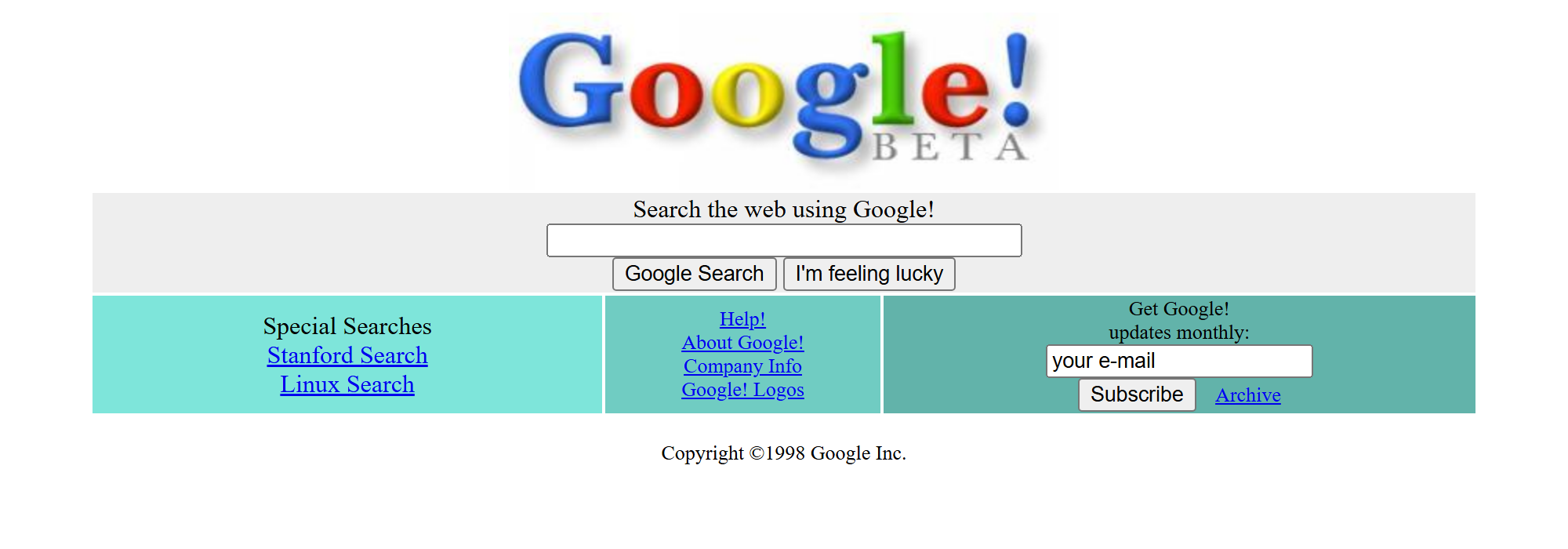
Google’s 1998 launch attacked the spam problem with PageRank: rank pages by who links to them, not just what they say. The result page it shipped was radical in its plainness — a white page with ten organic results, each a blue underlined title over a short snippet. “Ten blue links” became the shorthand for an entire era of the web. The same year, GoTo.com began auctioning search placements to advertisers — the two business models that would define the SERP were born months apart.
.jpg)
2000–2011: ads move in, the blend begins
Google AdWords (2000) put auction-priced ads alongside — and eventually above — organic results, turning the SERP into some of the most valuable advertising real estate ever created. Universal Search (2007) then ended the ten-blue-links era for good, blending images, news, maps, and video into one page. From that point on, organic listings competed not just with each other but with every module Google chose to show.
2012–2020: the SERP starts answering
The Knowledge Graph (2012) — “things, not strings” — let Google answer factual queries directly in a panel. Featured snippets (around 2014) promoted one page’s excerpt above the rest, and People Also Ask followed. In 2015 Google confirmed that mobile searches had overtaken desktop in its biggest markets, and the mobile SERP — smaller, more vertical, more module-heavy — became the default design target. Each step made the SERP more useful and made the click less necessary: the zero-click search era had begun.
2021–today: rewrites and AI answers
Two changes define the current SERP. First, since the August 2021 title update, Google rewrites the title it displays whenever it judges yours overlong, generic, or mismatched with the page — independent studies have measured rewrite rates above half of all pages. Second, generative answers arrived: the Search Generative Experience experiment (2023) became AI Overviews (2024), placing a synthesized, cited answer before any traditional result. The thirty-year arc is consistent — the SERP keeps absorbing the work the click used to do. What has not changed: every module, from featured snippet to AI citation, is still built from pages a crawler could reach and a snippet someone wrote.
Why the SERP decides your traffic
- Clicks collapse toward the top. CTR studies consistently find the first organic result earns roughly ten times the click share of position ten, with a steep drop after position three. Page two is, functionally, nowhere.
- More than half of searches end with no click at all. Independent clickstream research puts the share of Google searches that end without a click to any website at roughly six in ten — answered on the SERP itself. The clicks that remain are worth proportionally more, and the snippet is what wins them.
- Your snippet is your ad copy. The title and description are the only sales pitch a searcher sees before choosing. A truncated title or a machine-assembled description forfeits the comparison to whoever wrote theirs deliberately.
- You are one tenant on a crowded page. Ads, AI Overviews, and modules push organic results down. The less pixel space you get, the more the pixels you do get have to work.
Four SERP curiosities worth knowing
- The 41 shades of blue. Google once tested about forty subtly different blues for result links to find the one people clicked most — the winning shade reportedly added on the order of $200 million a year in ad revenue. On a page viewed billions of times daily, nothing is too small to optimise.
- “I’m Feeling Lucky” skipped the SERP — and cost a fortune. The button jumps straight to the first result, showing no ads at all; one widely cited 2007 estimate put the forgone revenue around $110 million a year. Google kept it anyway, as a statement of confidence in its ranking.
- Truncation is measured in pixels, not characters. Google cuts titles at a rendered width of roughly 600px on desktop, so WWW MMM truncates far sooner than little illicit titles at the same character count. Every “60 characters” rule you have read is an approximation of a pixel budget.
- No two people see the same SERP. Location, language, device, and history all reshape the page. The ranking you see for your own site is a sample of one — which is why checking your listing means checking the snippet you ship, not the position you happen to observe.
What you actually control
For all the modules Google owns, three inputs on your page still shape your organic listing directly:
- The title tag — your headline on the SERP, displayed as written when it fits the pixel budget and matches the page; rewritten when it does not.
- The meta description — not a ranking signal, but the default snippet text. Leave it blank or duplicate it across pages and Google assembles its own from whatever body text seems relevant.
- Structured data — the machine-readable layer that makes your listing eligible for rich results: breadcrumbs, FAQ drop-downs, review stars, product details.
None of these is guaranteed to display — Google reserves the right to rewrite all of them. But the reliable pattern from the rewrite research is that listings which fit the budget and match the page get shown as written, and listings which do not get replaced. Control here means removing Google’s reasons to intervene.
Preview your snippet before Google decides for you
The uncomfortable theme of this history is that the SERP is rendered, not published — you propose a listing and Google disposes. The practical answer is to check the proposal properly. Our free SERP simulator renders your title and meta description at Google’s actual font sizes and pixel widths, for desktop and mobile, with live character counts and truncation warnings — so you see where the cut lands before you publish, not after.
And if you want the outside-in view, every CrawlRanker scan report includes a snippet preview of the scanned page built from its live title and description, deep-linked into the simulator so you can edit your real metadata in place and watch the preview update. The SERP has been absorbing clicks for thirty years; the snippet is the part of it you still get to write.
Keep going
- SERP simulator — free, no signup.
- How CrawlRanker scores a site — the full public scoring rubric behind every scan.
Or scan any URL with the free CrawlRanker SEO audit — seven SEO checks plus an AI-content score in about 30 seconds.